(missing: GUROBI_LIBRARY) when trying to compile mip1_c++.cpp on windows
AnsweredI am using the Visual Studio 2022 compiler, and I have added the files from the example in my project folder. I am not sure how to link to the correct library files.


-

-
Gurobi Staff
Did you follow the instructions explained in How do I build C/C++ projects on Windows? – Gurobi Help Center or from the respective referenced articles?
0 -
-

Marika Karbstein Yes I think so. When I try to build with CMake I get the errors shown above.
I have also tried to follow the setup for Visual Studio, then I get these errors:

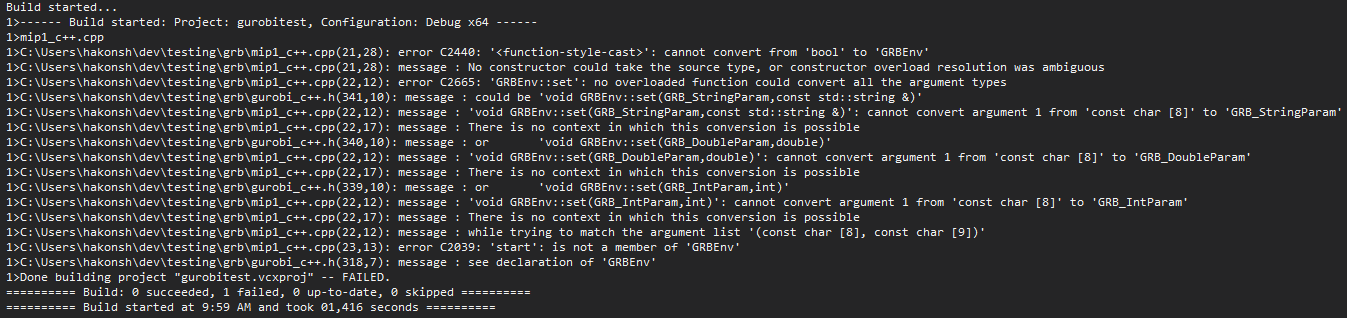
I have previously used Gurobi in Julia, that worked fine. Now I have to interact with another C++ project so need set up Gurobi in C++ too.
0 -
-

-
For the error:
[cmake] Could NOT find GUROBI (missing: GUROBI_LIBRARY)
You can just add the new version to the find library.
You can edit the \(\texttt{FindGUROBI.cmake}\) file to be:
find_library(GUROBI_LIBRARY
    NAMES gurobi gurobi100 gurobi110
    HINTS ${GUROBI_DIR} $ENV{GUROBI_HOME}
    PATH_SUFFIXES lib)
How do I use CMake to build Gurobi C/C++ projects?
Cheers,
David1 -
Please sign in to leave a comment.
Comments
3 comments