How to read excel from Gurobi screen?
AnsweredHi,
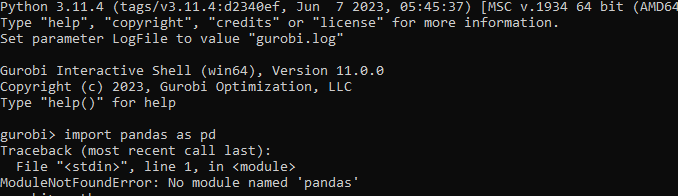
I have just install Gurobi, and started working on my optimization course project, I am facing a problem in opening excel files, because pandas and openpyxl do not work.
just to be clear, I do not use another compiler like jupyter or google collaborate. I just use the black screen of Gurobi.
it says that : No module named 'openpyxl'
No module named 'pandas
-
Official comment

-
Gurobi Staff
This post is more than two years old. Some information may not be up to date. For current information, please check the Gurobi Documentation or Knowledge Base. If you need more help, please create a new post in the community forum, or try Gurobot, our chatbot interface offering instant, expert-level support. -
-

-
Hi Baraa,
I just use the black screen of Gurobi.
Can you explain a little bit more what you mean by this? Are you using gurobi.sh or have you installed gurobipy in a Python environment?
- Riley
0 -
-

 0
-
-
-
Hi Baraa,
So this is the Gurobi shell which is an extension to a Python shell and not intended to be used with 3rd party packages like pandas or openpyxl.
My recommendation is that you download and install Python from scratch, then install your required packages into that python environment:
> python -m pip install gurobipy pandas openpyxl
See our article How do I install Gurobi for Python? for further details.
- Riley
0 -
Post is closed for comments.
Comments
4 comments