(missing: GUROBI_LIBRARY) when trying to compile mip1_c++.cpp on windows
AnsweredI am using the Visual Studio 2022 compiler, and I have added the files from the example in my project folder. I am not sure how to link to the correct library files.


-
Official comment

-
Gurobi Staff
This post is more than two years old. Some information may not be up to date. For current information, please check the Gurobi Documentation or Knowledge Base. If you need more help, please create a new post in the community forum, or try Gurobot, our chatbot interface offering instant, expert-level support. -
-

-
Did you follow the instructions explained in How do I build C/C++ projects on Windows? – Gurobi Help Center or from the respective referenced articles?
0 -
-

Marika Karbstein Yes I think so. When I try to build with CMake I get the errors shown above.
I have also tried to follow the setup for Visual Studio, then I get these errors:

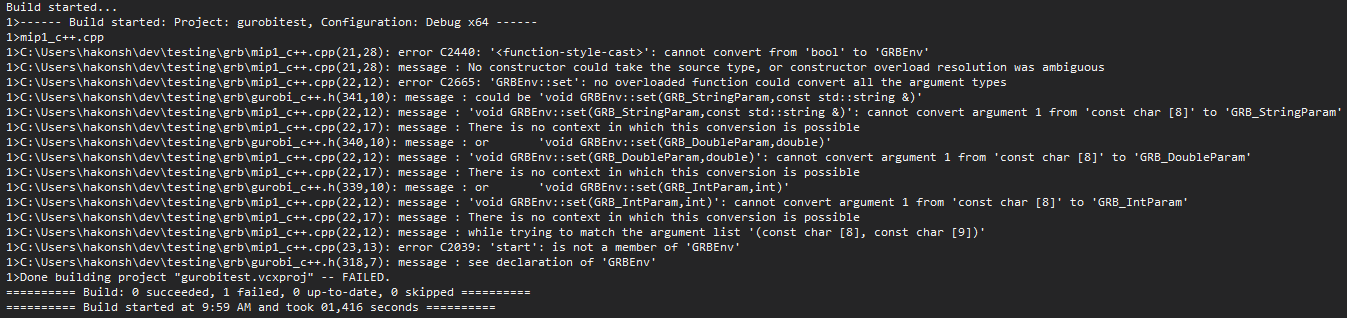
I have previously used Gurobi in Julia, that worked fine. Now I have to interact with another C++ project so need set up Gurobi in C++ too.
0 -
-

-
For the error:
[cmake] Could NOT find GUROBI (missing: GUROBI_LIBRARY)
You can just add the new version to the find library.
You can edit the \(\texttt{FindGUROBI.cmake}\) file to be:
find_library(GUROBI_LIBRARY
    NAMES gurobi gurobi100 gurobi110
    HINTS ${GUROBI_DIR} $ENV{GUROBI_HOME}
    PATH_SUFFIXES lib)
How do I use CMake to build Gurobi C/C++ projects?
Cheers,
David1 -
Post is closed for comments.
Comments
4 comments