How can I shut off adding "Learned cut" automatically?
AnsweredDear,
Could I shut off adding "Learned cut" automatically? And, how can I make it?
Thanks a lot.
-
Official comment

-
Gurobi Staff
This post is more than three years old. Some information may not be up to date. For current information, please check the Gurobi Documentation or Knowledge Base. If you need more help, please create a new post in the community forum. Or why not try our AI Gurobot?. -
-

-
Hi Ellen,
It is not possible to turn off "Learned cuts" only. You can turn these cuts only off by setting the Cuts parameter to 0 which turns off all cuts.
Could you elaborate why you what to turn off learned cuts? Please note that learned cuts are very cheap and are constructed "by accident" as described in the community post What's the meaning of "Learned Cut" in Log.
Best regards,
Jaromił0 -
-

Hi Jaromił,
Many thanks for your answer.
I would like to test and see the effect of certain cuts individually at the root node. That is the reason why I would like to turn off "learned cuts" (and also other cuts found by Gurobi).
However, the thing is that when I set the "Cuts" parameter to 0 (i.e., model.set(GRB_IntParam_Cuts, 0);), there are still some "Learned cuts" added as shown in the attached log file. Is it possible?
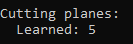
Thanks in advance.
0 -
-

-
Hi Ellen,
this is strange. I would like to investigate. Do you have an mps file with which you can reproduce the issue using the Gurobi command line tool? On Linux, you would call
gurobi_cl Cuts=0 mymodel.mps
If so, could you please send us this model?
Thanks,
Tobias
0 -
-
Hi Tobias,
Thank you for getting back to me. Unluckily, I have not got the problem solved. I will share 'mymodel.mps' file with you in the attached link. https://drive.google.com/file/d/11eiMVgCNK99pV7HehQAzUwoDnnV_OYFh/view?usp=sharing
Thank you for your time.
0 -
-
-
Thanks. I found the issue. Even if you disable cuts, we are allowing cuts to be generated in a cut loop that runs in parallel to the root node solve.
As a workaround, you could instead set the CutPasses parameter to 0 or use Cuts=0 with Threads=1.
We should fix this behavior in the next technical release of Gurobi so that Cuts=0 will also disable cuts in the parallel threads at the root node.
Regards,
Tobias
0 -
-
Thank you so much, Tobias.
0 -
-

-
Hi Ellen,
Gurobi 9.5.1 was recently released. Included in this release is a fix to disable all cuts including learned cuts in parallel threads at the root node when Cuts=0
Thank you for letting us know about this issue.
Best regards,
Maliheh
0 -
Post is closed for comments.
Comments
8 comments