A weird output, is it a bug of Gurobi 8.1.1?
AnsweredHi there, I am runing the following simple python code, the m.ObjVal output is 4.0, v.X is 0.01, while obviously, the minimum should be 0 if u is between 1/3 to 2/3?
My Gurobi version is 8.1.1, and there is no any error or warning when running this code, I am wondering why the result is not correct and how to change to make it work? thanks.
import gurobipy as gp
from gurobipy import GRB
def get_factor_from_usage_linear(u):
assert(u >= 0)
factor = 0.0
if u <= 0.333:
factor = 1.0
elif u <= 0.667:
factor = 3.0
elif u <= 0.9:
factor = 10.0
else:
factor = 50.0
return factor
try:
m = gp.Model("gwl")
u = m.addVar(lb=0.01, ub=0.99, vtype=GRB.CONTINUOUS, name="u")
f = get_factor_from_usage_linear(u)
# y = f * u
y = f
z = (y - 3.0) * (y - 3.0)
m.setObjective(sense=GRB.MINIMIZE, expr=z)
m.optimize()
for v in m.getVars():
print('%s %g' % (v.VarName, v.X))
print(m.ObjVal)
except gp.GurobiError as e:
print('Error code ' + str(e.errno) + ':' + str(e))
z = get_factor_from_usage_linear(0.5) - 3.0
print(z * z)
-
Official comment

-
Gurobi Staff
This post is more than three years old. Some information may not be up to date. For current information, please check the Gurobi Documentation or Knowledge Base. If you need more help, please create a new post in the community forum. Or why not try our AI Gurobot?. -
-

-
You cannot use a variable object in a conditional statement like \( \texttt{if u <= 0.333} \). In a math programming model, the coefficients for variables must be deterministically given when building the model. In other words, the coefficients for a variable cannot conditionally rely on the value of that variable. In the latest version of Gurobi (9.1.1), the code throws the following error:
Constraint has no bool value (are you trying "lb <= expr <= ub"?)Fortunately, there are some modeling tricks and tools you can use to work around this. Here, you are trying to model the following piecewise-linear function:
$$f(u) = \begin{cases}1& \textrm{if }\ \phantom{1/3 \leq }\ u \leq 1/3 \\ 3 & \textrm{if }\ 1/3 < u \leq 2/3 \\ 10 & \textrm{if }\ 2/3 < u \leq 0.9 \\ 50 & \textrm{if }\ 0.9\ < u. \end{cases}$$
Below is a graph of the function:
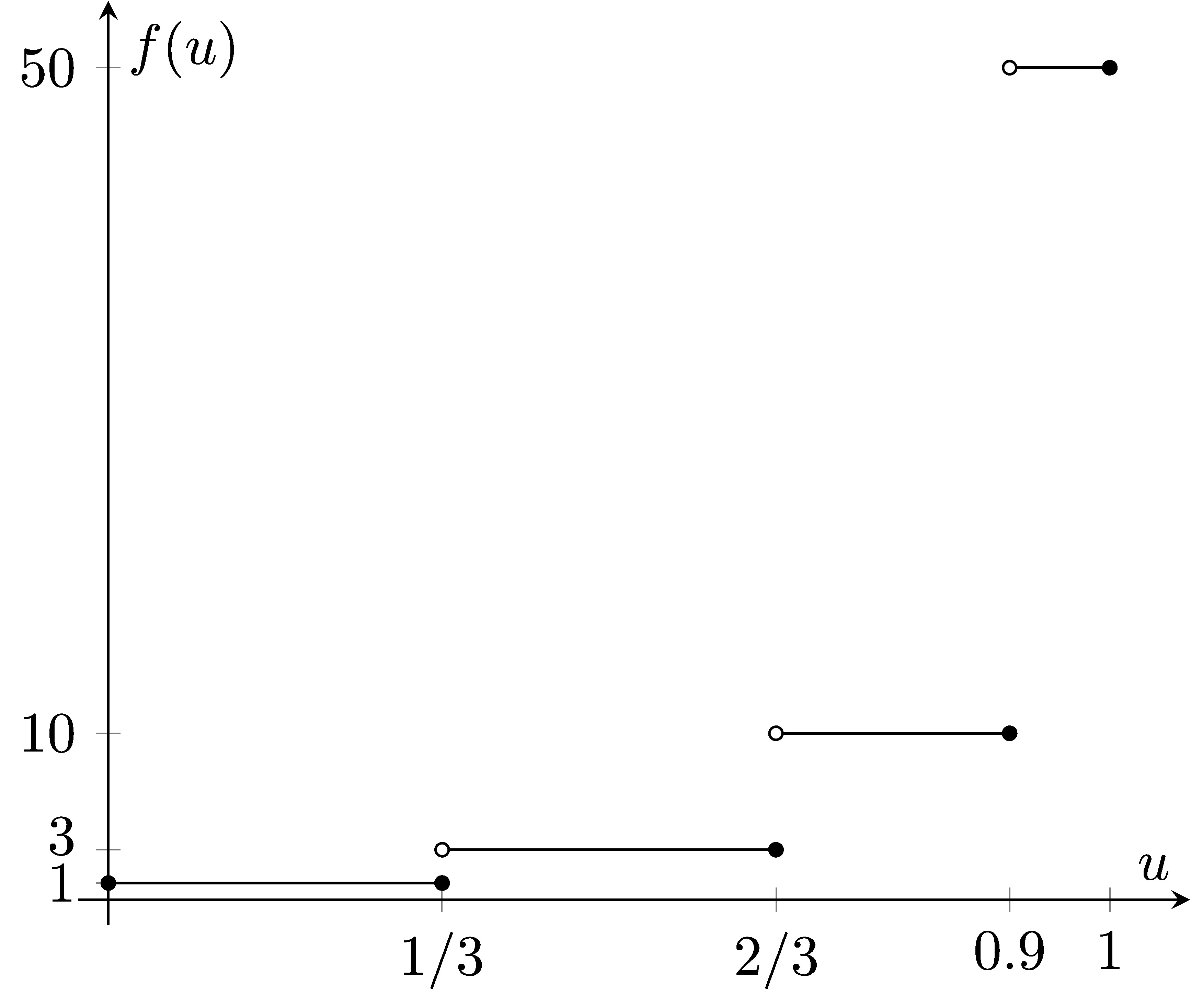
In Gurobi's Python API, you can add a piecewise-linear constraint to your model with the Model.addGenConstrPWL() method. We introduce a new variable \( y \), then use the points defining the piecewise-linear function to add the piecewise-linear constraint \( y = f(u) \):
y = m.addVar(name='y')
upts = [0, 1/3, 1/3, 2/3, 2/3, 0.9, 0.9, 1 ]
ypts = [1, 1,   3,   3,   10,  10,  50,  50]
m.addGenConstrPWL(u, y, upts, ypts, 'pwl_u_y')
With this formulation, we see one optimal solution is \( (u^*, y^*) = (1/3, 3) \). The optimal objective value is \( 0 \).
Note that due to numerical tolerances, Gurobi can pick either \( y \)-value at each "jump" in the piecewise-linear function. You can read more about this in the documentation.
0 -
-

Dear Eli, thanks for your kind help and very detailed response, it is work if u is defined variable. While in my original problem, the 'u' in my code actually is a combination of other variables, for example, u = (x1 + x2 + x3)/1000, x1, x2,x3, ... are the variables that I have defined before. I have simplified 'u' in the previous code to make it simple. While now it looks like it is not a proper simplification, sorry for that.
I have tried with your suggested way in Gurobi 9.1.1, it is working well if u is a defined variable, but it isn't working if u is a linear combination of other variables, any suggestions on this, many thanks.
0 -
-
-
You can explicitly make \( u \) a model variable, then add a constraint to the model setting \( u \) equal to your linear expression. E.g.:
u = m.addVar(name='u')
m.addConstr(u == (x[1] + x[2] + x[3])/1000)
Then the piecewise-linear approach I described should work the same way.
0 -
Post is closed for comments.
Comments
4 comments